Automating Oracle EPM Level0 Backups — With Email Reports, No Third-Party API Needed

If you run Oracle EPM Cloud (Planning, FreeForm, FCCS, or any of its siblings), you've probably reached for epmautomate exportEssbaseData at some point to pull a Level0 backup of a cube. It works well — but running it by hand, or firing it from cron with zero visibility into whether it actually succeeded, gets old fast.
This post walks through a small setup I built to fix that: a real EPM Automate backup script paired with a generic, dependency-light Python notifier that emails an HTML status report after every run — no third-party email service, no API key, nothing beyond Python's own standard library and a Bash script you can read top to bottom in five minutes.
The full code is on GitHub: vikepmlab/epm-level0-backup
The problem with a bare backup script
A typical Level0 export looks like this:
epmautomate exportEssbaseData CUBE_NAME FILE_NAME level=0
That one line does real work — but on its own it tells you nothing after the fact. Did it succeed? Did the download from the outbox actually land? Is the outbox quietly filling up with old exports nobody's cleaning up? A cron job that only writes to a log file nobody reads isn't much better than not having a backup job at all.
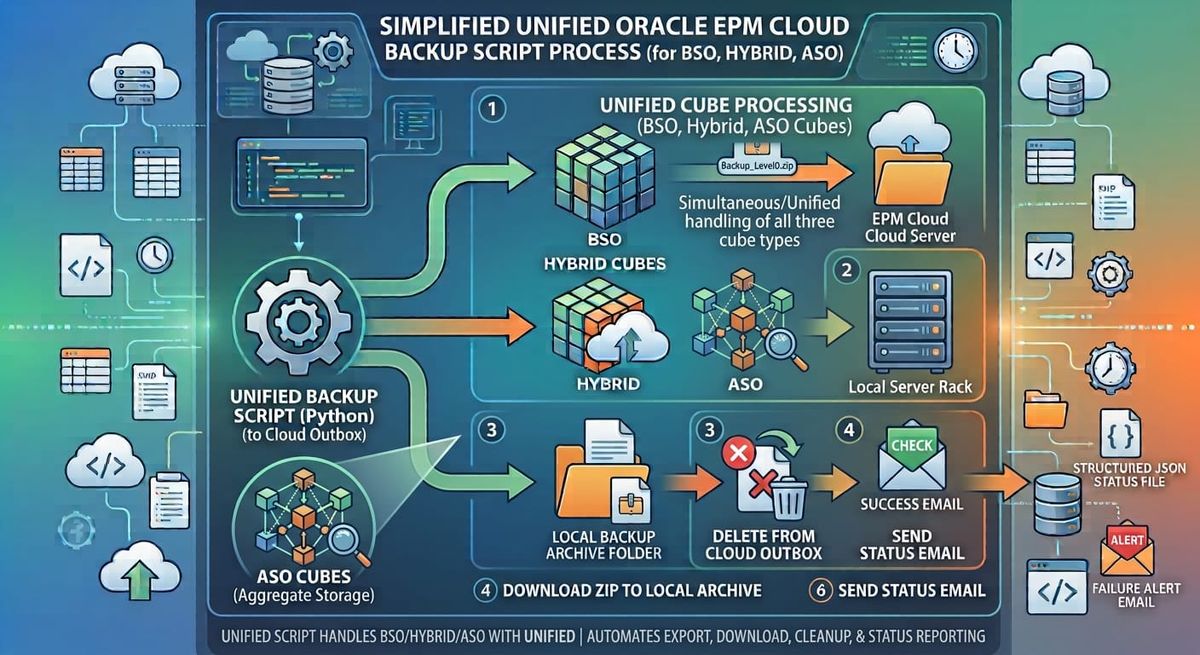
So the setup here does three things:
- Runs the actual Level0 export and download, for any number of cubes — BSO, Hybrid, or ASO. (Turns out
level=0is valid for all three per Oracle's own docs — onlylevel=Allis BSO/Hybrid-only, so one script covers every cube type without branching logic.) - Writes a structured JSON status file after every run — machine readable, not just a log dump.
- Emails an HTML report summarizing what happened, using nothing but Python's built-in
smtplib— works with Gmail, Office365, or an internal relay server your org already runs.
Why the script clears the EPM outbox before every export
This part's easy to miss if you've never had it bite you: the zip exportEssbaseData produces lands in the EPM Cloud outbox and stays there — it isn't cleaned up automatically. Left alone, that outbox accumulates one export per cube per run, forever. That's not just untidy; a growing outbox eats into your application's storage allocation and slows down anything that lists it, including the verification step this script itself relies on.
So before every export, the script deletes any zip left over from a previous run for that cube, verifies it's actually gone, and only then kicks off the new export. Small step, but it keeps the outbox at a flat, predictable footprint run over run instead of growing without bound.
Plain SMTP, no account signup required
It's tempting to reach for a transactional email API for something like this — but that means an account, an API key to protect, and one more service to depend on for a job that just needs to send one email after it finishes. Python's smtplib and email modules do the same job with zero third-party dependencies:
with smtplib.SMTP(smtp_host, smtp_port) as server:
    server.starttls()
    server.login(username, password)
    server.sendmail(from_address, recipients, message.as_string())
That works against Gmail (with an App Password), Office365, or — the pattern most organizations actually use — an internal relay server that's allow-listed by hostname and doesn't need a login at all. The config file has a toggle for exactly that (auth_required = true or false), so the same script covers both a personal test setup and a real internal deployment.
Everything lives in one config file
No environment variables to hunt down, no code to edit. A single config.ini (using Python's built-in configparser — no extra package needed) holds the job name, the cube list, retention policy, and email/SMTP settings:
[smtp]
host = smtp.office365.com
port = 587
use_tls = true
auth_required = true
username = you@example.com
password_env_var = BACKUP_NOTIFIER_SMTP_PASSWORD
The password itself is never written to disk — it's pulled from an environment variable at runtime, or (for quick local testing only) directly from the file with a clear warning not to commit it that way.
Try it yourself
Rather than just describe the code, here's the actual logic — click through and see the real export command, the real outbox-cleanup block, and a live-rendered version of the email report. The last tab runs genuine Python in your browser via Pyodide — edit the sample data and watch the report regenerate in real time, no server involved.
The Level0 export logic real code
From epm_level0_backup.sh. Works the same way for BSO, Hybrid, and ASO cubes — Oracle's docs confirm level=0 is valid for all three; only level=All is BSO/Hybrid-only.
# -------- STEP 1: Run Level0 Export --------
log "[STEP 1] Running Level0 export for cube: $CUBE"
run_to_log "$EPM_BIN/epmautomate.sh" exportEssbaseData \
    "$CUBE" \
    "$EPM_ZIP_NAME" \
    level=0
EXPORT_RC=$?
📄 epm_level0_backup.sh · lines 172–180
# -------- STEP 2: Download zip from EPM outbox --------
log "[STEP 2] Downloading $EPM_ZIP_NAME..."
run_to_log "$EPM_BIN/epmautomate.sh" downloadFile \
    "$EPM_ZIP_OUTBOX_PATH" \
    "$LOCAL_ZIP_PATH"
DOWNLOAD_RC=$?
📄 epm_level0_backup.sh · lines 195–200
Get the code
The full project — epm_level0_backup.sh, backup_notifier.py, and config.ini — is up on GitHub: vikepmlab/epm-level0-backup
Setup instructions, troubleshooting, and the full JSON status contract are all in the repo's README. If you're running this in an organization with an internal SMTP relay rather than a personal email account, that's covered too — no code changes needed, just a couple of config lines.
Provided as-is — review and test in a non-production environment before relying on it in yours.